[Feature help] tile view with angular distribution

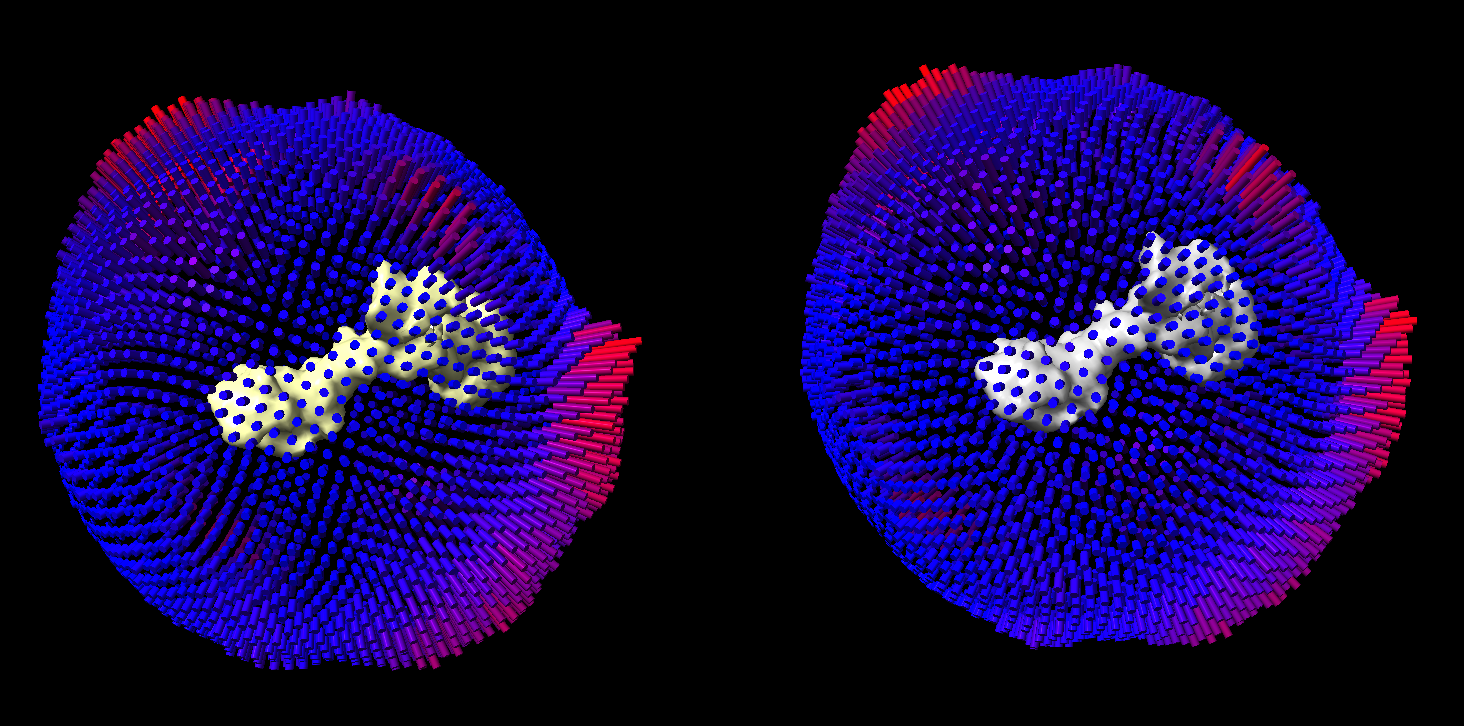
Hello ChimeraX developers and users, I am looking for a feature of variant of the tile command. I have the following below with two maps each with their own angular distribution file (.BILD) which is an output from cryoSPARC to give the RELION style of angular distribution. Currently I have opened all 4 items at once and simply use the right mouse tool to translate the map and its respective angular distribution to the right. But upon rotating views, some rotation directions are not kept in place. If I were to use the tile command, it would place the angular distribution as its own item (in the case of using no flags for “tile” all four items would be in a 2x2 orientation. I am wondering if there is a way to have something similar to the tile command where you can rotate each item on its own independent axis but with multiple models/items on the same axis. For example here, I want to assess how the angular distribution of the two maps are after heterogenous refinement sorting. I want to tile the two maps and its respective angular distribution and be able to rotate them independently of the other set. [image.png] Thank you, Adam Nguyen University of Washington

Hi Adam, You have two maps and have two angular distribution BILD models. I gather you want to group put them side by side with one map and its BILD model on the left and the other map and BILD model on the right, and you want rotating to rotate the two about their own centers so you can compare. The ChimeraX tile command almost does this but if you have 4 top-level models #1,2,3,4 then it will make a 2 by 2 grid of models with each of the 4 models rotating about its own center. To get just the two map + BILD groups you want to have just two top-level models. The "tile" command lays out the top level model. So if map #1 goes with BILD model #2 you could put the BILD model as a submodel of the map with the rename command rename #2 id #1.5 Likewise if map #3 goes with BILD model #4 you could put the BILD model as a submodel of its map rename #4 to #3.5 Then when you use the "tile" command you will get two side by side maps and their BILD models #1 and #3. You can do it a different way where the map and BILD are at the same level in the model hierarchy but under a single parent model rename #1,2 id #5 rename #3,4 id #6 This makes your models #5.1, #5.2 and #6.1, #6.2 and again tiling those will tile the two groups #5 and #6 side by side. Tom
On Mar 16, 2026, at 1:55 PM, Nguyen, Adam via ChimeraX-users <chimerax-users@cgl.ucsf.edu> wrote:
Hello ChimeraX developers and users,
I am looking for a feature of variant of the tile command.
I have the following below with two maps each with their own angular distribution file (.BILD) which is an output from cryoSPARC to give the RELION style of angular distribution. Currently I have opened all 4 items at once and simply use the right mouse tool to translate the map and its respective angular distribution to the right. But upon rotating views, some rotation directions are not kept in place. If I were to use the tile command, it would place the angular distribution as its own item (in the case of using no flags for “tile” all four items would be in a 2x2 orientation.
I am wondering if there is a way to have something similar to the tile command where you can rotate each item on its own independent axis but with multiple models/items on the same axis. For example here, I want to assess how the angular distribution of the two maps are after heterogenous refinement sorting. I want to tile the two maps and its respective angular distribution and be able to rotate them independently of the other set. <image.png>
Thank you,
Adam Nguyen
University of Washington _______________________________________________ ChimeraX-users mailing list -- chimerax-users@cgl.ucsf.edu To unsubscribe send an email to chimerax-users-leave@cgl.ucsf.edu Archives: https://mail.cgl.ucsf.edu/mailman/archives/list/chimerax-users@cgl.ucsf.edu/
participants (2)
-
 Nguyen, Adam
 -
 Tom Goddard