Difficulty for installing isolde in chimeraX 1.11.1

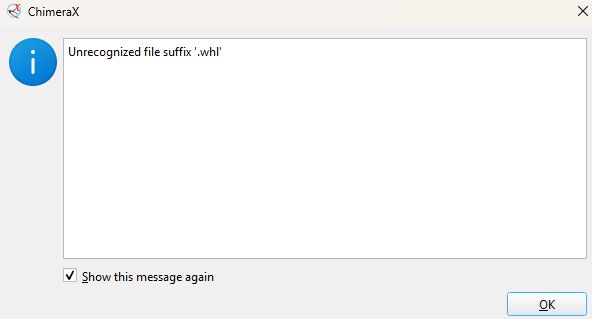
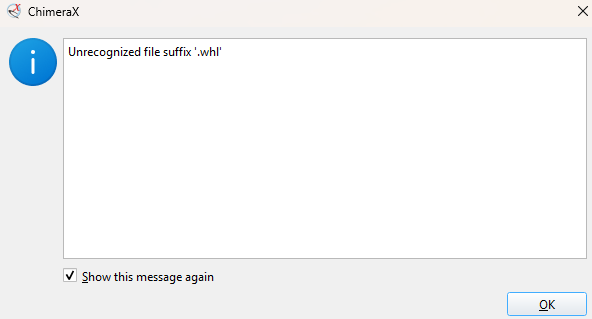
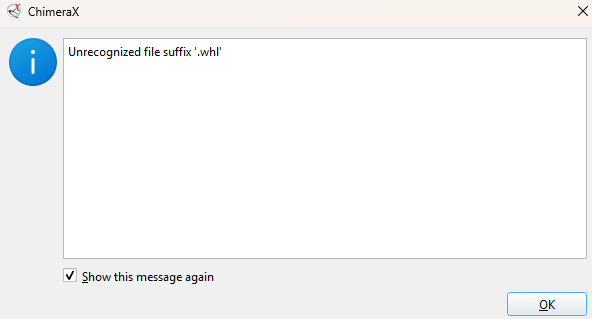
Hi, I have downloaded isolde for refinement of cryo-EM maps using isolde. But, I cannot open the downloaded file for integrating isolde. Photo attached below. How to resolve this issue ? Thank you Subrata [image: image.png]

Hi Subrata, It looks like you've downloaded ISOLDE via your normal web browser, and are trying to install it from the downloaded file. While it *is* possible to do it this way, in almost all cases it's better to do it via ChimeraX's built-in mechanism (Tools/More Tools... in the top menu). That will automatically handle any dependencies on other ChimeraX bundles. If for some reason you do need to do it manually via the downloaded files, you'll first need to download and install the ChimeraX_Clipper bundle. To install a .whl file, you'll need to use the command: toolshed install {file} The easiest way in practice is to type "toolshed install " and then drag-and-drop the file from your system file browser onto the command line to auto-fill the path and filename. Hope this helps! Tristan On Wed, May 13, 2026 at 11:04 AM Subrata Duary cy20d750 < cy20d750@smail.iitm.ac.in> wrote:
Hi, I have downloaded isolde for refinement of cryo-EM maps using isolde. But, I cannot open the downloaded file for integrating isolde. Photo attached below. How to resolve this issue ?
Thank you Subrata
[image: image.png]
-- Altos Labs UK Limited | England | Company reg 13484917 Registered address: 3rd Floor 1 Ashley Road, Altrincham, Cheshire, United Kingdom, WA14 2DT
Thank you for your reply.I followed the chimeraX in-built mechanism (tools_more tools...) but still the same problem facing. On Wed, 13 May, 2026, 3:49 pm Tristan Croll, <tcroll@altoslabs.com> wrote:
Hi Subrata,
It looks like you've downloaded ISOLDE via your normal web browser, and are trying to install it from the downloaded file. While it *is* possible to do it this way, in almost all cases it's better to do it via ChimeraX's built-in mechanism (Tools/More Tools... in the top menu). That will automatically handle any dependencies on other ChimeraX bundles.
If for some reason you do need to do it manually via the downloaded files, you'll first need to download and install the ChimeraX_Clipper bundle. To install a .whl file, you'll need to use the command:
toolshed install {file}
The easiest way in practice is to type "toolshed install " and then drag-and-drop the file from your system file browser onto the command line to auto-fill the path and filename.
Hope this helps!
Tristan
On Wed, May 13, 2026 at 11:04 AM Subrata Duary cy20d750 < cy20d750@smail.iitm.ac.in> wrote:
Hi, I have downloaded isolde for refinement of cryo-EM maps using isolde. But, I cannot open the downloaded file for integrating isolde. Photo attached below. How to resolve this issue ?
Thank you Subrata
[image: image.png]
Altos Labs UK Limited | England | Company reg 13484917 Registered address: 3rd Floor 1 Ashley Road, Altrincham, Cheshire, United Kingdom, WA14 2DT <https://www.google.com/maps/search/1+Ashley+Road,+Altrincham,+Cheshire,+Unit...>
Hmm... that's odd. Could you report it via the ChimeraX Help/Report a Bug menu entry? That will provide a more complete history of events to help work out what's going on. On Wed, May 13, 2026 at 11:39 AM Subrata Duary cy20d750 < cy20d750@smail.iitm.ac.in> wrote:
Thank you for your reply.I followed the chimeraX in-built mechanism (tools_more tools...) but still the same problem facing.
On Wed, 13 May, 2026, 3:49 pm Tristan Croll, <tcroll@altoslabs.com> wrote:
Hi Subrata,
It looks like you've downloaded ISOLDE via your normal web browser, and are trying to install it from the downloaded file. While it *is* possible to do it this way, in almost all cases it's better to do it via ChimeraX's built-in mechanism (Tools/More Tools... in the top menu). That will automatically handle any dependencies on other ChimeraX bundles.
If for some reason you do need to do it manually via the downloaded files, you'll first need to download and install the ChimeraX_Clipper bundle. To install a .whl file, you'll need to use the command:
toolshed install {file}
The easiest way in practice is to type "toolshed install " and then drag-and-drop the file from your system file browser onto the command line to auto-fill the path and filename.
Hope this helps!
Tristan
On Wed, May 13, 2026 at 11:04 AM Subrata Duary cy20d750 < cy20d750@smail.iitm.ac.in> wrote:
Hi, I have downloaded isolde for refinement of cryo-EM maps using isolde. But, I cannot open the downloaded file for integrating isolde. Photo attached below. How to resolve this issue ?
Thank you Subrata
[image: image.png]
Altos Labs UK Limited | England | Company reg 13484917 Registered address: 3rd Floor 1 Ashley Road, Altrincham, Cheshire, United Kingdom, WA14 2DT <https://www.google.com/maps/search/1+Ashley+Road,+Altrincham,+Cheshire,+Unit...>
-- Altos Labs UK Limited | England | Company reg 13484917 Registered address: 3rd Floor 1 Ashley Road, Altrincham, Cheshire, United Kingdom, WA14 2DT
Thank you for your reply.Now it's working with ChimeraX 1.9. I appreciate you. On Wed, 13 May, 2026, 4:20 pm Tristan Croll, <tcroll@altoslabs.com> wrote:
Hmm... that's odd. Could you report it via the ChimeraX Help/Report a Bug menu entry? That will provide a more complete history of events to help work out what's going on.
On Wed, May 13, 2026 at 11:39 AM Subrata Duary cy20d750 < cy20d750@smail.iitm.ac.in> wrote:
Thank you for your reply.I followed the chimeraX in-built mechanism (tools_more tools...) but still the same problem facing.
On Wed, 13 May, 2026, 3:49 pm Tristan Croll, <tcroll@altoslabs.com> wrote:
Hi Subrata,
It looks like you've downloaded ISOLDE via your normal web browser, and are trying to install it from the downloaded file. While it *is* possible to do it this way, in almost all cases it's better to do it via ChimeraX's built-in mechanism (Tools/More Tools... in the top menu). That will automatically handle any dependencies on other ChimeraX bundles.
If for some reason you do need to do it manually via the downloaded files, you'll first need to download and install the ChimeraX_Clipper bundle. To install a .whl file, you'll need to use the command:
toolshed install {file}
The easiest way in practice is to type "toolshed install " and then drag-and-drop the file from your system file browser onto the command line to auto-fill the path and filename.
Hope this helps!
Tristan
On Wed, May 13, 2026 at 11:04 AM Subrata Duary cy20d750 < cy20d750@smail.iitm.ac.in> wrote:
Hi, I have downloaded isolde for refinement of cryo-EM maps using isolde. But, I cannot open the downloaded file for integrating isolde. Photo attached below. How to resolve this issue ?
Thank you Subrata
[image: image.png]
Altos Labs UK Limited | England | Company reg 13484917 Registered address: 3rd Floor 1 Ashley Road, Altrincham, Cheshire, United Kingdom, WA14 2DT <https://www.google.com/maps/search/1+Ashley+Road,+Altrincham,+Cheshire,+Unit...>
Altos Labs UK Limited | England | Company reg 13484917 Registered address: 3rd Floor 1 Ashley Road, Altrincham, Cheshire, United Kingdom, WA14 2DT <https://www.google.com/maps/search/1+Ashley+Road,+Altrincham,+Cheshire,+Unit...>
participants (2)
-
 Subrata Duary cy20d750
 -
 Tristan Croll