
Hi all, Prior to this I was an avid IMOD user. There I was able to set a clipping plane and move/rotate the model such that the model clipping plan would NOT clip any other parts of the model. Essentially i want to create a clipping plane, set it and then transform the model such that no other parts of the model will be clipped. Is this possible? I could not figure it out for the life of me. It's pretty simple in IMOD, just not sure if it's possible in ChimeraX. Would love to hear what you guys think. -Jon

Hi Jon, Not exactly sure if this is what you are after, but have you tried the per-model clipping planes? https://www.cgl.ucsf.edu/chimerax/docs/user/commands/clip.html (see "clip model") Cheers Oli
On Nov 14, 2025, at 2:31 PM, Jon via ChimeraX-users <chimerax-users@cgl.ucsf.edu> wrote:
Hi all,
Prior to this I was an avid IMOD user. There I was able to set a clipping plane and move/rotate the model such that the model clipping plan would NOT clip any other parts of the model. Essentially i want to create a clipping plane, set it and then transform the model such that no other parts of the model will be clipped. Is this possible? I could not figure it out for the life of me. It's pretty simple in IMOD, just not sure if it's possible in ChimeraX.
Would love to hear what you guys think.
-Jon _______________________________________________ ChimeraX-users mailing list -- chimerax-users@cgl.ucsf.edu To unsubscribe send an email to chimerax-users-leave@cgl.ucsf.edu Archives: https://mail.cgl.ucsf.edu/mailman/archives/list/chimerax-users@cgl.ucsf.edu/

Hi Jon, The per-model clipping capability allows clipping one model but not clipping other models. But if the question is instead about having the clip plane stay in a fixed position relative to the data as you rotate the scene then you want to use the "front" and "back" clip planes with the clip command. The "near" and "far" clip planes are always oriented perpendicular to the view so when rotating the scene with near/far clip plane it will clip different parts of the model since those planes are not fixed relative to the data being shown. Tom
On Nov 14, 2025, at 12:02 PM, Oliver Clarke via ChimeraX-users <chimerax-users@cgl.ucsf.edu> wrote:
Hi Jon,
Not exactly sure if this is what you are after, but have you tried the per-model clipping planes?
https://www.cgl.ucsf.edu/chimerax/docs/user/commands/clip.html (see "clip model")
Cheers Oli
On Nov 14, 2025, at 2:31 PM, Jon via ChimeraX-users <chimerax-users@cgl.ucsf.edu> wrote:
Hi all,
Prior to this I was an avid IMOD user. There I was able to set a clipping plane and move/rotate the model such that the model clipping plan would NOT clip any other parts of the model. Essentially i want to create a clipping plane, set it and then transform the model such that no other parts of the model will be clipped. Is this possible? I could not figure it out for the life of me. It's pretty simple in IMOD, just not sure if it's possible in ChimeraX.
Would love to hear what you guys think.
-Jon _______________________________________________ ChimeraX-users mailing list -- chimerax-users@cgl.ucsf.edu To unsubscribe send an email to chimerax-users-leave@cgl.ucsf.edu Archives: https://mail.cgl.ucsf.edu/mailman/archives/list/chimerax-users@cgl.ucsf.edu/
_______________________________________________ ChimeraX-users mailing list -- chimerax-users@cgl.ucsf.edu To unsubscribe send an email to chimerax-users-leave@cgl.ucsf.edu Archives: https://mail.cgl.ucsf.edu/mailman/archives/list/chimerax-users@cgl.ucsf.edu/
Hi Tom and Oli, Thank you for your helpful input. Turning off the near and far clip planes helped. And I can control the Z position of the plane with my mouse. However, I can't move the plane in the X and Y direction, nor is the clip plane shown. How might I be able to do this? Your feedback is much appreciated. I'm attaching a video demonstrating the IMOD clip plane, where you can essentially turn on the clip plane for a single object/model or for the entire model. Then you can easily toggle between moving clip plane up and down the Z axis (command + move mouse) or around the X and Y axes (command + middle mouse button + move mouse). Also the clip plane can be easily shown by clicking a box. Thanks and looking forward to hearing from you! Best, Jon On Fri, Nov 14, 2025 at 3:22 PM Tom Goddard <goddard@sonic.net> wrote:
Hi Jon,
The per-model clipping capability allows clipping one model but not clipping other models. But if the question is instead about having the clip plane stay in a fixed position relative to the data as you rotate the scene then you want to use the "front" and "back" clip planes with the clip command. The "near" and "far" clip planes are always oriented perpendicular to the view so when rotating the scene with near/far clip plane it will clip different parts of the model since those planes are not fixed relative to the data being shown.
Tom
On Nov 14, 2025, at 12:02 PM, Oliver Clarke via ChimeraX-users < chimerax-users@cgl.ucsf.edu> wrote:
Hi Jon,
Not exactly sure if this is what you are after, but have you tried the per-model clipping planes?
https://www.cgl.ucsf.edu/chimerax/docs/user/commands/clip.html (see "clip model")
Cheers Oli
On Nov 14, 2025, at 2:31 PM, Jon via ChimeraX-users < chimerax-users@cgl.ucsf.edu> wrote:
Hi all,
Prior to this I was an avid IMOD user. There I was able to set a clipping plane and move/rotate the model such that the model clipping plan would NOT clip any other parts of the model. Essentially i want to create a clipping plane, set it and then transform the model such that no other parts of the model will be clipped. Is this possible? I could not figure it out for the life of me. It's pretty simple in IMOD, just not sure if it's possible in ChimeraX.
Would love to hear what you guys think.
-Jon _______________________________________________ ChimeraX-users mailing list -- chimerax-users@cgl.ucsf.edu To unsubscribe send an email to chimerax-users-leave@cgl.ucsf.edu Archives: https://mail.cgl.ucsf.edu/mailman/archives/list/chimerax-users@cgl.ucsf.edu/
_______________________________________________ ChimeraX-users mailing list -- chimerax-users@cgl.ucsf.edu To unsubscribe send an email to chimerax-users-leave@cgl.ucsf.edu Archives: https://mail.cgl.ucsf.edu/mailman/archives/list/chimerax-users@cgl.ucsf.edu/
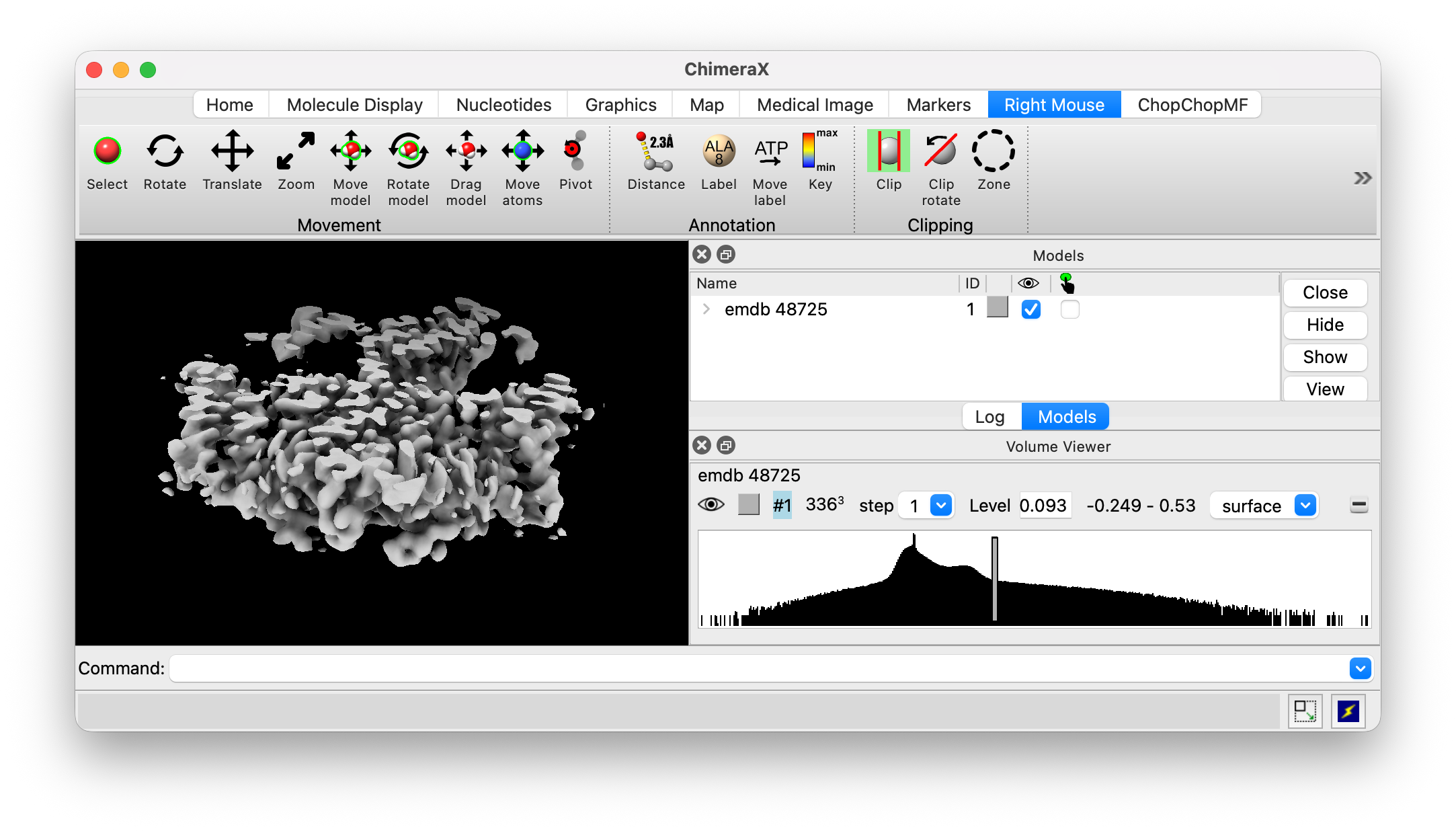
Hi Jon, To rotate the clip plane there is a "Clip rotate" mouse mode in the Right Mouse toolbar. It is next to the Clip mouse mode. See the image below. For some mouse modes that translate objects you hold the shift key to rotate. But with the Clip mouse mode holding the Shift key down causes parallel front and back clip planes to move together. That is why there is a separate "Clip rotate" mode. ChimeraX doesn't currently have a way to show the clip plane as a rectangle like in IMOD. Tom
On Nov 14, 2025, at 12:48 PM, Choy, Jon via ChimeraX-users <chimerax-users@cgl.ucsf.edu> wrote:
Hi Tom and Oli,
Thank you for your helpful input. Turning off the near and far clip planes helped. And I can control the Z position of the plane with my mouse. However, I can't move the plane in the X and Y direction, nor is the clip plane shown. How might I be able to do this?
Your feedback is much appreciated. I'm attaching a video demonstrating the IMOD clip plane, where you can essentially turn on the clip plane for a single object/model or for the entire model. Then you can easily toggle between moving clip plane up and down the Z axis (command + move mouse) or around the X and Y axes (command + middle mouse button + move mouse). Also the clip plane can be easily shown by clicking a box.
Thanks and looking forward to hearing from you!
Best, Jon
On Fri, Nov 14, 2025 at 3:22 PM Tom Goddard <goddard@sonic.net <mailto:goddard@sonic.net>> wrote:
Hi Jon,
The per-model clipping capability allows clipping one model but not clipping other models. But if the question is instead about having the clip plane stay in a fixed position relative to the data as you rotate the scene then you want to use the "front" and "back" clip planes with the clip command. The "near" and "far" clip planes are always oriented perpendicular to the view so when rotating the scene with near/far clip plane it will clip different parts of the model since those planes are not fixed relative to the data being shown.
Tom
On Nov 14, 2025, at 12:02 PM, Oliver Clarke via ChimeraX-users <chimerax-users@cgl.ucsf.edu <mailto:chimerax-users@cgl.ucsf.edu>> wrote:
Hi Jon,
Not exactly sure if this is what you are after, but have you tried the per-model clipping planes?
https://www.cgl.ucsf.edu/chimerax/docs/user/commands/clip.html (see "clip model")
Cheers Oli
On Nov 14, 2025, at 2:31 PM, Jon via ChimeraX-users <chimerax-users@cgl.ucsf.edu <mailto:chimerax-users@cgl.ucsf.edu>> wrote:
Hi all,
Prior to this I was an avid IMOD user. There I was able to set a clipping plane and move/rotate the model such that the model clipping plan would NOT clip any other parts of the model. Essentially i want to create a clipping plane, set it and then transform the model such that no other parts of the model will be clipped. Is this possible? I could not figure it out for the life of me. It's pretty simple in IMOD, just not sure if it's possible in ChimeraX.
Would love to hear what you guys think.
-Jon _______________________________________________ ChimeraX-users mailing list -- chimerax-users@cgl.ucsf.edu <mailto:chimerax-users@cgl.ucsf.edu> To unsubscribe send an email to chimerax-users-leave@cgl.ucsf.edu <mailto:chimerax-users-leave@cgl.ucsf.edu> Archives: https://mail.cgl.ucsf.edu/mailman/archives/list/chimerax-users@cgl.ucsf.edu/
_______________________________________________ ChimeraX-users mailing list -- chimerax-users@cgl.ucsf.edu <mailto:chimerax-users@cgl.ucsf.edu> To unsubscribe send an email to chimerax-users-leave@cgl.ucsf.edu <mailto:chimerax-users-leave@cgl.ucsf.edu> Archives: https://mail.cgl.ucsf.edu/mailman/archives/list/chimerax-users@cgl.ucsf.edu/
<IMOD-clip-plane.mp4>_______________________________________________ ChimeraX-users mailing list -- chimerax-users@cgl.ucsf.edu To unsubscribe send an email to chimerax-users-leave@cgl.ucsf.edu Archives: https://mail.cgl.ucsf.edu/mailman/archives/list/chimerax-users@cgl.ucsf.edu/
Forgot to attach the screenshot, here it is. 
On Nov 14, 2025, at 3:18 PM, Tom Goddard <goddard@sonic.net> wrote:
Hi Jon,
To rotate the clip plane there is a "Clip rotate" mouse mode in the Right Mouse toolbar. It is next to the Clip mouse mode. See the image below. For some mouse modes that translate objects you hold the shift key to rotate. But with the Clip mouse mode holding the Shift key down causes parallel front and back clip planes to move together. That is why there is a separate "Clip rotate" mode.
ChimeraX doesn't currently have a way to show the clip plane as a rectangle like in IMOD.
Tom
On Nov 14, 2025, at 12:48 PM, Choy, Jon via ChimeraX-users <chimerax-users@cgl.ucsf.edu> wrote:
Hi Tom and Oli,
Thank you for your helpful input. Turning off the near and far clip planes helped. And I can control the Z position of the plane with my mouse. However, I can't move the plane in the X and Y direction, nor is the clip plane shown. How might I be able to do this?
Your feedback is much appreciated. I'm attaching a video demonstrating the IMOD clip plane, where you can essentially turn on the clip plane for a single object/model or for the entire model. Then you can easily toggle between moving clip plane up and down the Z axis (command + move mouse) or around the X and Y axes (command + middle mouse button + move mouse). Also the clip plane can be easily shown by clicking a box.
Thanks and looking forward to hearing from you!
Best, Jon
On Fri, Nov 14, 2025 at 3:22 PM Tom Goddard <goddard@sonic.net <mailto:goddard@sonic.net>> wrote:
Hi Jon,
The per-model clipping capability allows clipping one model but not clipping other models. But if the question is instead about having the clip plane stay in a fixed position relative to the data as you rotate the scene then you want to use the "front" and "back" clip planes with the clip command. The "near" and "far" clip planes are always oriented perpendicular to the view so when rotating the scene with near/far clip plane it will clip different parts of the model since those planes are not fixed relative to the data being shown.
Tom
On Nov 14, 2025, at 12:02 PM, Oliver Clarke via ChimeraX-users <chimerax-users@cgl.ucsf.edu <mailto:chimerax-users@cgl.ucsf.edu>> wrote:
Hi Jon,
Not exactly sure if this is what you are after, but have you tried the per-model clipping planes?
https://www.cgl.ucsf.edu/chimerax/docs/user/commands/clip.html (see "clip model")
Cheers Oli
On Nov 14, 2025, at 2:31 PM, Jon via ChimeraX-users <chimerax-users@cgl.ucsf.edu <mailto:chimerax-users@cgl.ucsf.edu>> wrote:
Hi all,
Prior to this I was an avid IMOD user. There I was able to set a clipping plane and move/rotate the model such that the model clipping plan would NOT clip any other parts of the model. Essentially i want to create a clipping plane, set it and then transform the model such that no other parts of the model will be clipped. Is this possible? I could not figure it out for the life of me. It's pretty simple in IMOD, just not sure if it's possible in ChimeraX.
Would love to hear what you guys think.
-Jon _______________________________________________ ChimeraX-users mailing list -- chimerax-users@cgl.ucsf.edu <mailto:chimerax-users@cgl.ucsf.edu> To unsubscribe send an email to chimerax-users-leave@cgl.ucsf.edu <mailto:chimerax-users-leave@cgl.ucsf.edu> Archives: https://mail.cgl.ucsf.edu/mailman/archives/list/chimerax-users@cgl.ucsf.edu/
_______________________________________________ ChimeraX-users mailing list -- chimerax-users@cgl.ucsf.edu <mailto:chimerax-users@cgl.ucsf.edu> To unsubscribe send an email to chimerax-users-leave@cgl.ucsf.edu <mailto:chimerax-users-leave@cgl.ucsf.edu> Archives: https://mail.cgl.ucsf.edu/mailman/archives/list/chimerax-users@cgl.ucsf.edu/
<IMOD-clip-plane.mp4>_______________________________________________ ChimeraX-users mailing list -- chimerax-users@cgl.ucsf.edu To unsubscribe send an email to chimerax-users-leave@cgl.ucsf.edu Archives: https://mail.cgl.ucsf.edu/mailman/archives/list/chimerax-users@cgl.ucsf.edu/
Got it, thanks so much!! Jon On Fri, Nov 14, 2025 at 6:20 PM Tom Goddard <goddard@sonic.net> wrote:
Forgot to attach the screenshot, here it is.
[image: clip_mouse_modes.png]
On Nov 14, 2025, at 3:18 PM, Tom Goddard <goddard@sonic.net> wrote:
Hi Jon,
To rotate the clip plane there is a "Clip rotate" mouse mode in the Right Mouse toolbar. It is next to the Clip mouse mode. See the image below. For some mouse modes that translate objects you hold the shift key to rotate. But with the Clip mouse mode holding the Shift key down causes parallel front and back clip planes to move together. That is why there is a separate "Clip rotate" mode.
ChimeraX doesn't currently have a way to show the clip plane as a rectangle like in IMOD.
Tom
On Nov 14, 2025, at 12:48 PM, Choy, Jon via ChimeraX-users < chimerax-users@cgl.ucsf.edu> wrote:
Hi Tom and Oli,
Thank you for your helpful input. Turning off the near and far clip planes helped. And I can control the Z position of the plane with my mouse. However, I can't move the plane in the X and Y direction, nor is the clip plane shown. How might I be able to do this?
Your feedback is much appreciated. I'm attaching a video demonstrating the IMOD clip plane, where you can essentially turn on the clip plane for a single object/model or for the entire model. Then you can easily toggle between moving clip plane up and down the Z axis (command + move mouse) or around the X and Y axes (command + middle mouse button + move mouse). Also the clip plane can be easily shown by clicking a box.
Thanks and looking forward to hearing from you!
Best, Jon
On Fri, Nov 14, 2025 at 3:22 PM Tom Goddard <goddard@sonic.net> wrote:
Hi Jon,
The per-model clipping capability allows clipping one model but not clipping other models. But if the question is instead about having the clip plane stay in a fixed position relative to the data as you rotate the scene then you want to use the "front" and "back" clip planes with the clip command. The "near" and "far" clip planes are always oriented perpendicular to the view so when rotating the scene with near/far clip plane it will clip different parts of the model since those planes are not fixed relative to the data being shown.
Tom
On Nov 14, 2025, at 12:02 PM, Oliver Clarke via ChimeraX-users < chimerax-users@cgl.ucsf.edu> wrote:
Hi Jon,
Not exactly sure if this is what you are after, but have you tried the per-model clipping planes?
https://www.cgl.ucsf.edu/chimerax/docs/user/commands/clip.html (see "clip model")
Cheers Oli
On Nov 14, 2025, at 2:31 PM, Jon via ChimeraX-users < chimerax-users@cgl.ucsf.edu> wrote:
Hi all,
Prior to this I was an avid IMOD user. There I was able to set a clipping plane and move/rotate the model such that the model clipping plan would NOT clip any other parts of the model. Essentially i want to create a clipping plane, set it and then transform the model such that no other parts of the model will be clipped. Is this possible? I could not figure it out for the life of me. It's pretty simple in IMOD, just not sure if it's possible in ChimeraX.
Would love to hear what you guys think.
-Jon _______________________________________________ ChimeraX-users mailing list -- chimerax-users@cgl.ucsf.edu To unsubscribe send an email to chimerax-users-leave@cgl.ucsf.edu Archives: https://mail.cgl.ucsf.edu/mailman/archives/list/chimerax-users@cgl.ucsf.edu/
_______________________________________________ ChimeraX-users mailing list -- chimerax-users@cgl.ucsf.edu To unsubscribe send an email to chimerax-users-leave@cgl.ucsf.edu Archives: https://mail.cgl.ucsf.edu/mailman/archives/list/chimerax-users@cgl.ucsf.edu/
<IMOD-clip-plane.mp4>_______________________________________________ ChimeraX-users mailing list -- chimerax-users@cgl.ucsf.edu To unsubscribe send an email to chimerax-users-leave@cgl.ucsf.edu Archives: https://mail.cgl.ucsf.edu/mailman/archives/list/chimerax-users@cgl.ucsf.edu/
participants (4)
-
 Choy, Jon
 -
jon_choy@g.harvard.edu
-
 Oliver Clarke
 -
 Tom Goddard