Blurry Volume Rendering in ChimeraX ≥1.7 on macOS (HiDPI Regression Affecting ArtiaX)

A little comment to the message: The following text was generated with help of an AI, because I’ve got frustrated trying to solve the issue myself and ran out of strength; I apologise for that. Yet it describes the problem well: Dear ChimeraX/ArtiaX developers, I would like to report an issue with volume rendering quality on macOS that appears to have been introduced in ChimeraX versions 1.7 and later, and that affects ArtiaX-based tomography workflows. System details macOS 26.0.1 on Apple Silicon (M2 Pro; RAM 16GB) ChimeraX 1.6.1 (works correctly) ChimeraX 1.7–1.10.1 (affected) ArtiaX 0.3 (works correctly) ArtiaX 0.6 (affected) Native ARM64 ChimeraX binary used (not via Rosetta) Tested both on the built-in display and external 4K monitor Issue summary When displaying reconstructed tomograms (binned 4x to pixel value 10A) in ChimeraX 1.7 and newer, the volume appears blurry, pixelated, and significantly lower in resolution compared to Fiji or ChimeraX 1.6.1. The same tomogram, same hardware, same display settings, and same scaling factors show correct high-quality sampling in ChimeraX 1.6.1 + ArtiaX 0.3. In contrast, ChimeraX ≥1.7 + ArtiaX ≥0.6 consistently produce a downsampled-looking rendering. Troubleshooting performed To rule out common macOS/Qt/HiDPI issues, I have tested: Forcing HiDPI mode (QT_ENABLE_HIGHDPI_SCALING, QT_SCALE_FACTOR, etc.) Launching via arch -arm64 Removing and reinstalling ChimeraX completely (including preferences) Disabling external 4K monitor scaling Resetting ChimeraX user settings None of these affected the outcome. Only reverting ChimeraX to version 1.6.1 restores correct rendering quality. Behavior differences observed In ChimeraX 1.6, tomograms appear crisp and match Fiji’s display quality. In ChimeraX 1.7–1.10.1, the same tomograms appear visibly blurred and pixelated. The command graphics quality high or similar parameters appear unsupported or ineffective in newer versions. ArtiaX toolbar loads but seems to use lower-resolution textures for slice volumes. This strongly suggests a rendering pipeline change around the transition from ChimeraX 1.6.1 → 1.7 that affects ArtiaX’s volume display on macOS (possibly due to Qt scaling, offscreen framebuffer size, or texture sampling changes). Request Could you please check whether: ArtiaX 0.6 is triggering half-resolution internal textures on macOS? The new rendering pipeline introduced in ChimeraX ≥1.7 affects HiDPI texture sampling? There is a fallback path on macOS ARM that reduces framebuffer resolution? Any configuration options can restore full-resolution sampling? To illustrate the difference between the two options (ChimeraX 1.6 vs 1.10.1) I have included the snapshots from two different M2 MacBooks running two different versions of ChimeraX/ArtiaX combinations; the tomogram file, tomogram optical slice position are the same, the screen magnification and the regions displayed are very similar. Thank you very much for your work and for looking into this. Best regards, Yaroslav ------------------------------------------- Dr. Yaroslav Tsytsyura Cellular Biophysics Institute of Medical Physics and Biophysics University of Muenster Robert-Koch Str., 31 48149, Muenster GERMANY phone: +49 251 8351 010 fax: +49 251 8355 121 Mobile: +49 157 895 47789 web-page: https://www.medizin.uni-muenster.de/impb/das-institut/elektronenmikroskopie....  
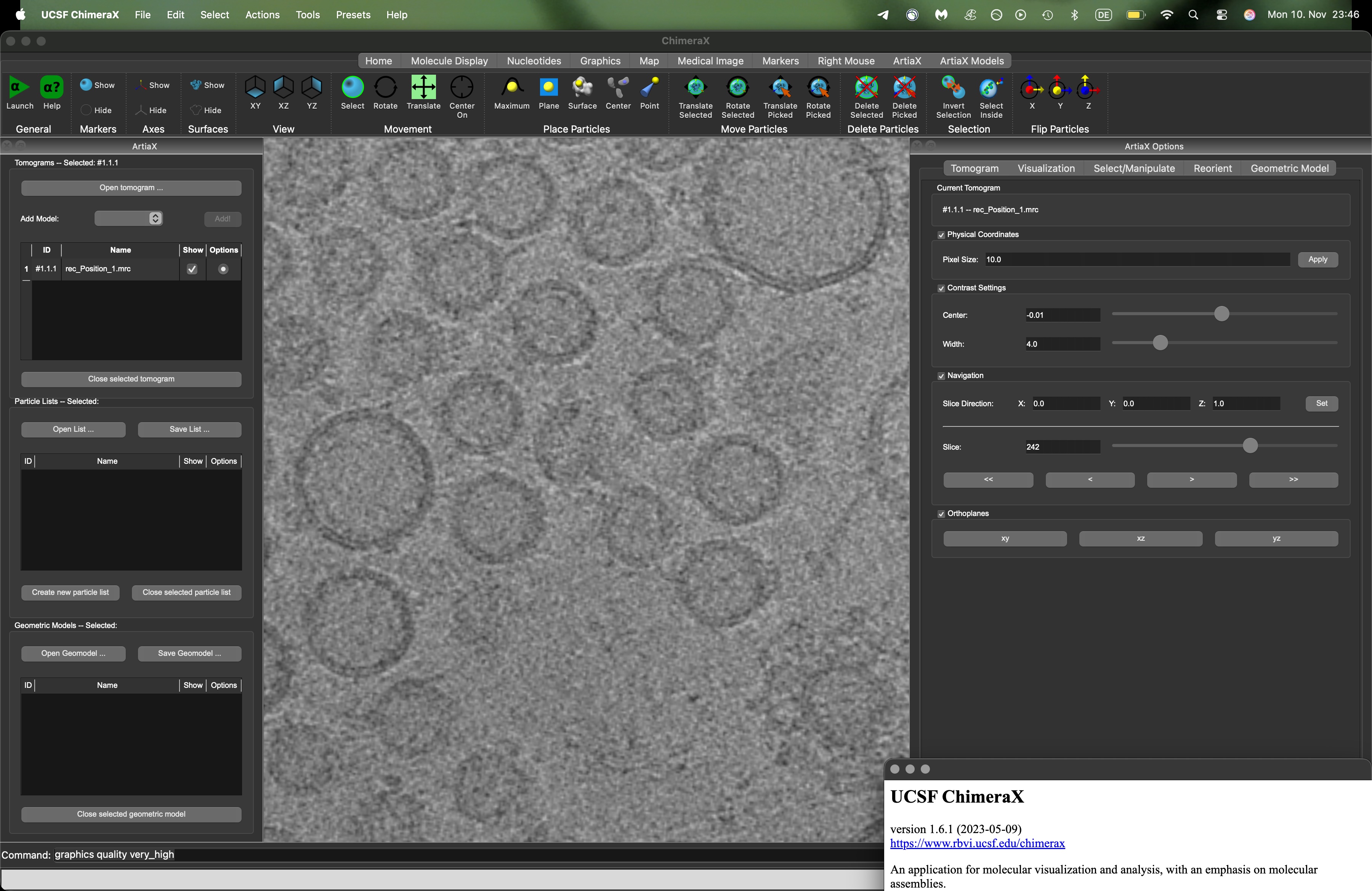
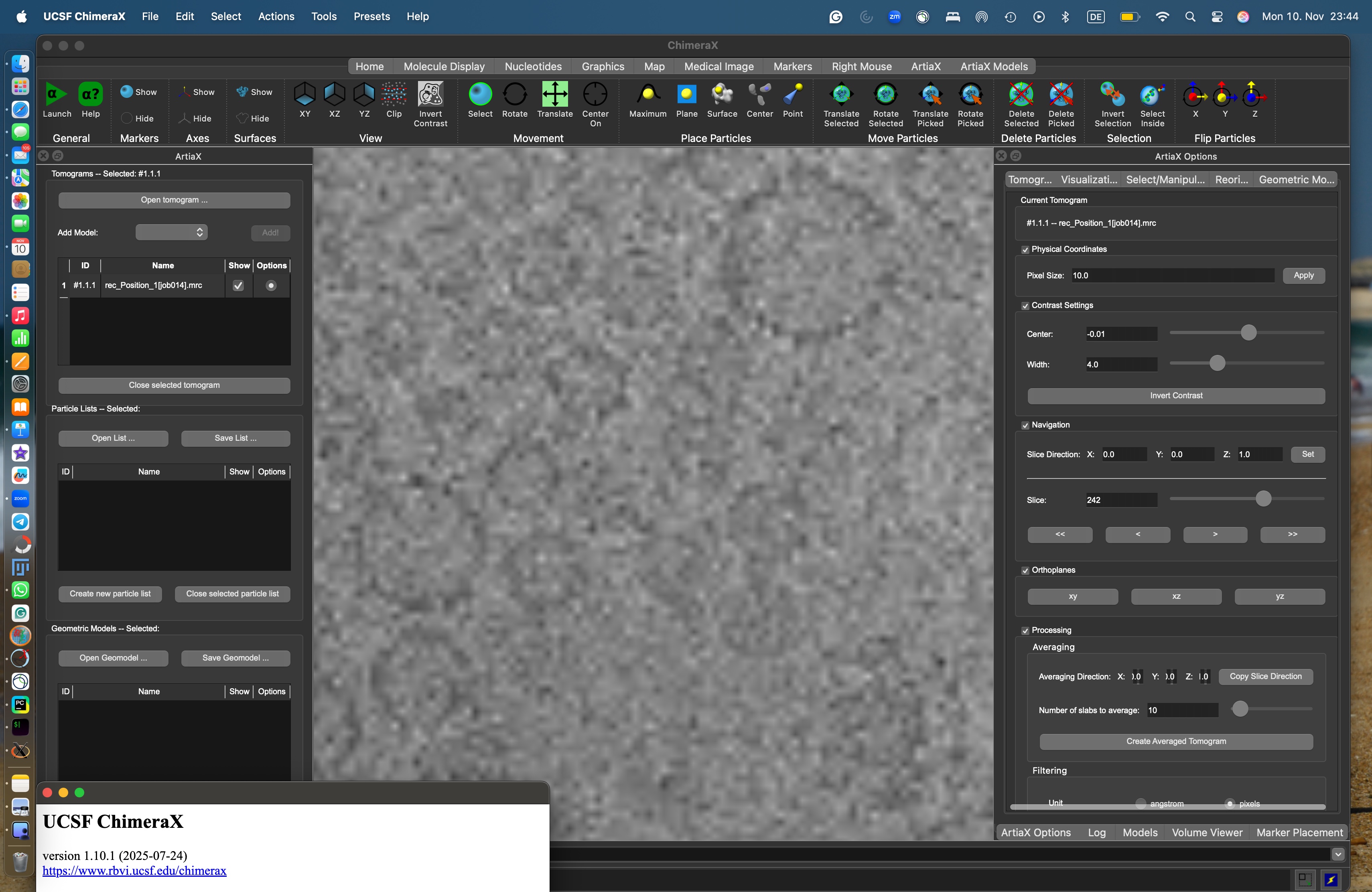

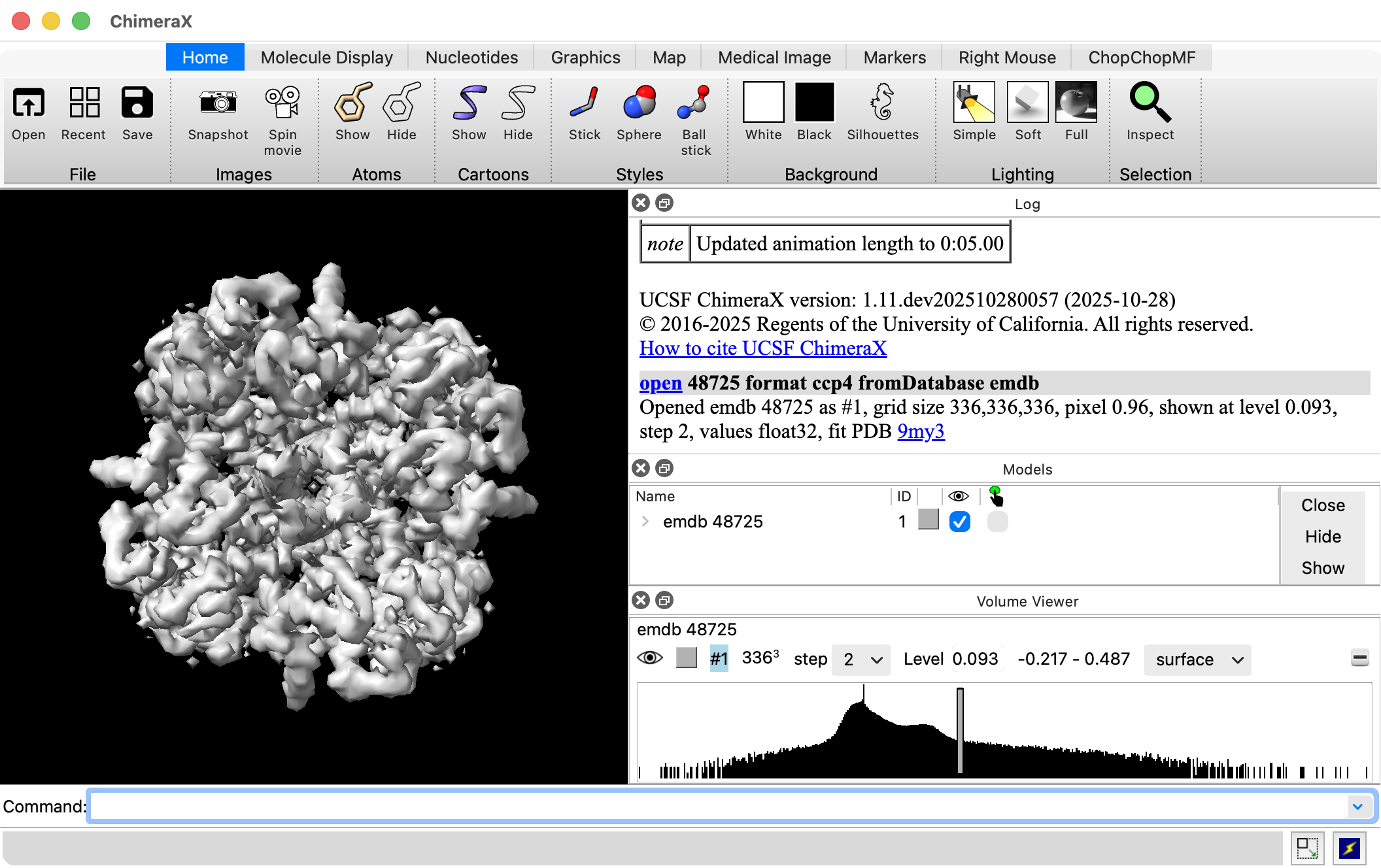
Hi Yaroslav, I think the explanation of this is probably that in the newer ArtiaX it is showing subsampled map data. In ChimeraX maps can be shown subsampled, for instance showing every other grid point or every 4th grid point from the file along all 3 axes (x,y,z). That will create the poor quality appearance shown in your images. You can see the subsampling being used by looking at the Volume Viewer user interface, menu Tools / Volume Data / Volume Viewer. It will show "step 1" above the histogram if full resolution is being used and "step 2" if every other grid point is being shown. The purpose of the subsampling is to allow loading data larger than can fit in memory, or to load large datasets fast to get a quick look. Of course it should use full resolution if those factors are not important. ArtiaX had some problems in the past generating graphics errors from running out of memory trying to show tomograms at full resolution. Utz Ermel, the developer of ArtiaX might have changed the code and used subsampling that is causing the problem you see. Utz would have to comment on that. You can change the step size with the ChimeraX volume command. For instance if #1 is your tomogram volume #1 step 1 You can change ChimeraX to not automatically use subsampling for large maps with command volume default limitvoxelcount false save true This command will save this setting for all future sessions. Tom Here's an image of Volume Viewer showing it used step 2 when I opened a 336 x 336 x 336 map. 
On Nov 11, 2025, at 3:40 AM, Yaroslav Tsytsyura via ChimeraX-users <chimerax-users@cgl.ucsf.edu> wrote:
A little comment to the message: The following text was generated with help of an AI, because I’ve got frustrated trying to solve the issue myself and ran out of strength; I apologise for that. Yet it describes the problem well:
Dear ChimeraX/ArtiaX developers,
I would like to report an issue with volume rendering quality on macOS that appears to have been introduced in ChimeraX versions 1.7 and later, and that affects ArtiaX-based tomography workflows.
System details
macOS 26.0.1 on Apple Silicon (M2 Pro; RAM 16GB)
ChimeraX 1.6.1 (works correctly)
ChimeraX 1.7–1.10.1 (affected)
ArtiaX 0.3 (works correctly)
ArtiaX 0.6 (affected)
Native ARM64 ChimeraX binary used (not via Rosetta)
Tested both on the built-in display and external 4K monitor
Issue summary When displaying reconstructed tomograms (binned 4x to pixel value 10A) in ChimeraX 1.7 and newer, the volume appears blurry, pixelated, and significantly lower in resolution compared to Fiji or ChimeraX 1.6.1. The same tomogram, same hardware, same display settings, and same scaling factors show correct high-quality sampling in ChimeraX 1.6.1 + ArtiaX 0.3.
In contrast, ChimeraX ≥1.7 + ArtiaX ≥0.6 consistently produce a downsampled-looking rendering.
Troubleshooting performed To rule out common macOS/Qt/HiDPI issues, I have tested:
Forcing HiDPI mode (QT_ENABLE_HIGHDPI_SCALING, QT_SCALE_FACTOR, etc.)
Launching via arch -arm64
Removing and reinstalling ChimeraX completely (including preferences)
Disabling external 4K monitor scaling
Resetting ChimeraX user settings
None of these affected the outcome. Only reverting ChimeraX to version 1.6.1 restores correct rendering quality.
Behavior differences observed
In ChimeraX 1.6, tomograms appear crisp and match Fiji’s display quality.
In ChimeraX 1.7–1.10.1, the same tomograms appear visibly blurred and pixelated.
The command graphics quality high or similar parameters appear unsupported or ineffective in newer versions.
ArtiaX toolbar loads but seems to use lower-resolution textures for slice volumes.
This strongly suggests a rendering pipeline change around the transition from ChimeraX 1.6.1 → 1.7 that affects ArtiaX’s volume display on macOS (possibly due to Qt scaling, offscreen framebuffer size, or texture sampling changes).
Request Could you please check whether:
ArtiaX 0.6 is triggering half-resolution internal textures on macOS?
The new rendering pipeline introduced in ChimeraX ≥1.7 affects HiDPI texture sampling?
There is a fallback path on macOS ARM that reduces framebuffer resolution?
Any configuration options can restore full-resolution sampling?
To illustrate the difference between the two options (ChimeraX 1.6 vs 1.10.1) I have included the snapshots from two different M2 MacBooks running two different versions of ChimeraX/ArtiaX combinations; the tomogram file, tomogram optical slice position are the same, the screen magnification and the regions displayed are very similar.
Thank you very much for your work and for looking into this.
Best regards,
Yaroslav
------------------------------------------- Dr. Yaroslav Tsytsyura
Cellular Biophysics Institute of Medical Physics and Biophysics University of Muenster Robert-Koch Str., 31 48149, Muenster GERMANY
phone: +49 251 8351 010 fax: +49 251 8355 121 Mobile: +49 157 895 47789 web-page: https://www.medizin.uni-muenster.de/impb/das-institut/elektronenmikroskopie.... <Screenshot Chi1.6.jpg>
<Screenshot Chi1.10.jpg> _______________________________________________ ChimeraX-users mailing list -- chimerax-users@cgl.ucsf.edu To unsubscribe send an email to chimerax-users-leave@cgl.ucsf.edu Archives: https://mail.cgl.ucsf.edu/mailman/archives/list/chimerax-users@cgl.ucsf.edu/
Thank you Tom! I tried and immediately it worked out… I wish all the problems could be solved that easy… I definitely looked for a solution in a wrong place. Sorry for bothering. Many thanks and best regards, Yaroslav ------------------------------------------- Dr. Yaroslav Tsytsyura Cellular Biophysics Institute of Medical Physics and Biophysics University of Muenster Robert-Koch Str., 31 48149, Muenster GERMANY phone: +49 251 8351 010 fax: +49 251 8355 121 Mobile: +49 157 895 47789 web-page: https://www.medizin.uni-muenster.de/impb/das-institut/elektronenmikroskopie....
On 11. Nov 2025, at 20:58, Tom Goddard <goddard@sonic.net> wrote:
volume default limitvoxelcount false save true
participants (2)
-
 Tom Goddard
 -
 Yaroslav Tsytsyura