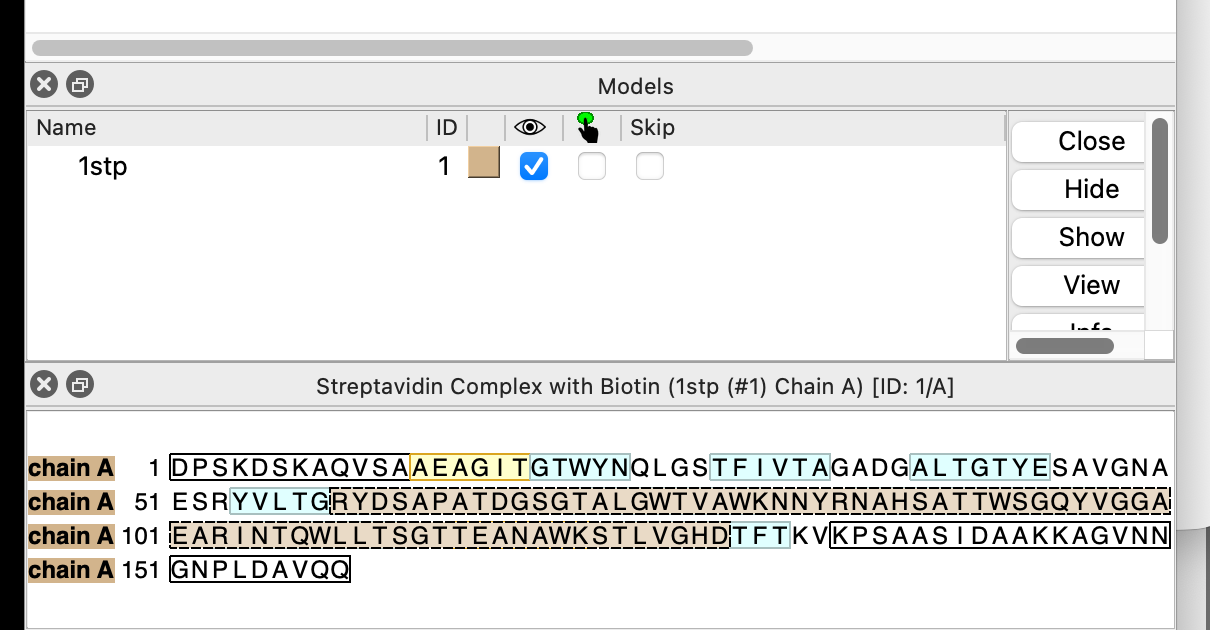
So the Sequence Viewer did change between ChimeraX 1.11 and 1.12. In 1.12, it respects your desktop color scheme/theme/mode, and it appears that you have chosen a dark one. You can turn that off for just ChimeraX with a command line argument as mentioned in the previous message. For example, on Linux, run "chimerax --color-scheme light" to override your desktop setting and use a light background for all of ChimeraX's user interface elements. If you use a desktop icon to start ChimeraX, how to add a command line argument is very different on each platform (Windows, macOS, or Linux). On Windows, the icon's properties can be edited. On Linux, the icon is a file that can be edited. On macOS, my googling indicated that a helper application is needed. An alternative is to change the color scheme/theme/mode for all applications in your desktop settings outside of ChimeraX. The ability to change the color scheme from within ChimeraX awaits the work in ticket #20811. HTH, Greg On 8/3/2026 11:26 AM, Ralph Loring wrote:
Hi Greg, I have both 1.11 and 1.12 on my laptop and 1.11 has a white background while that of 1.12 is black. So I was assuming that it's a property of ChimeraX, not my computer. There is a "settings" function under favorites, and a "Background Color" under that, but it seems to be for the background for the modeling window, or am I missing something? I also tried Steve's suggestion of Ctl-Click in the sequence pane, but that didn't work Thanks, Ralph
On Mon, Aug 3, 2026 at 1:35 AM Greg Couch via ChimeraX-users <chimerax-users@cgl.ucsf.edu> wrote:
That sounds like the intentional behavior of the Sequence Viewer respecting your choice of a dark desktop scheme. If you change your desktop preferences to use a light color scheme, ChimeraX will use that instead. You can also force ChimeraX to use a light (white) background for all user interface elements by giving the "--color-scheme light" command line argument when you start ChimeraX (or "--color-scheme dark" to force dark mode). On many systems, ChimeraX will change it's color scheme dynamically when you change the desktop's color scheme. I've created a ticket, #20811, for adding a ChimeraX GUI setting to change the startup behavior.
HTH,
Greg
On 8/2/2026 5:41 PM, Ralph Loring via ChimeraX-users wrote:
Hi Steve and ChimeraX, While we're talking about the Sequence Viewer, I have another issue. In ChimeraX 1.11 the panel on the right (including the sequence viewer) has a white background, but in ChimeraX 1.12, the background is black. Depending on the computer, I sometimes cannot read the sequence on the sequence viewer, particularly if it is highlighted on a black background. In 1.12 is there a way to set the background back to white? Thanks for a great program, but sometimes your "improvements" are not. Sincerely,
Ralph Loring
On Sun, Aug 2, 2026 at 6:56 AM Steven Brawer via ChimeraX-users <chimerax-users@cgl.ucsf.edu> wrote:
A basic question.
Example with one model. When I make a partial selection by *click-drag *in a sequence viewer , which turns the sequence bright green (in the sequence viewer), then *ctl-click* in the background of the graphics window to deselect, that bright green color in the viewer turns brown, as below.
PastedGraphic-3.png
What does this mean? Why does it do this? How to restore the original coloring?
When I run the command *sequence chain /A*, it apparently creates a new instance of the sequence viewer (deleting the old instance). This is OK with just one model.
The problem with this is that if I have several models and do this, it puts the new instance at the bottom of the other sequence viewer instances, so I have to move it if I want the same physical order as in the Model pane. This becomes annoying fast.
Is there a way to restore the original coloring in the sequence viewer without completely replacing the original instance of the sequence viewer with an new instance, and leaving it where it is (in the case of several models).
Thank you
Steve
PS: I have ransacked the documentation and tried Google, but have not found an answer. This does not mean the answer is not there, only that I missed it or didn't understand it when I saw it. _______________________________________________ ChimeraX-users mailing list -- chimerax-users@cgl.ucsf.edu To unsubscribe send an email to chimerax-users-leave@cgl.ucsf.edu Archives: https://mail.cgl.ucsf.edu/mailman/archives/list/chimerax-users@cgl.ucsf.edu/
_______________________________________________ ChimeraX-users mailing list --chimerax-users@cgl.ucsf.edu To unsubscribe send an email tochimerax-users-leave@cgl.ucsf.edu Archives:https://mail.cgl.ucsf.edu/mailman/archives/list/chimerax-users@cgl.ucsf.edu/
_______________________________________________ ChimeraX-users mailing list -- chimerax-users@cgl.ucsf.edu To unsubscribe send an email to chimerax-users-leave@cgl.ucsf.edu Archives: https://mail.cgl.ucsf.edu/mailman/archives/list/chimerax-users@cgl.ucsf.edu/